
 for iphone
your tempo.
your stage.
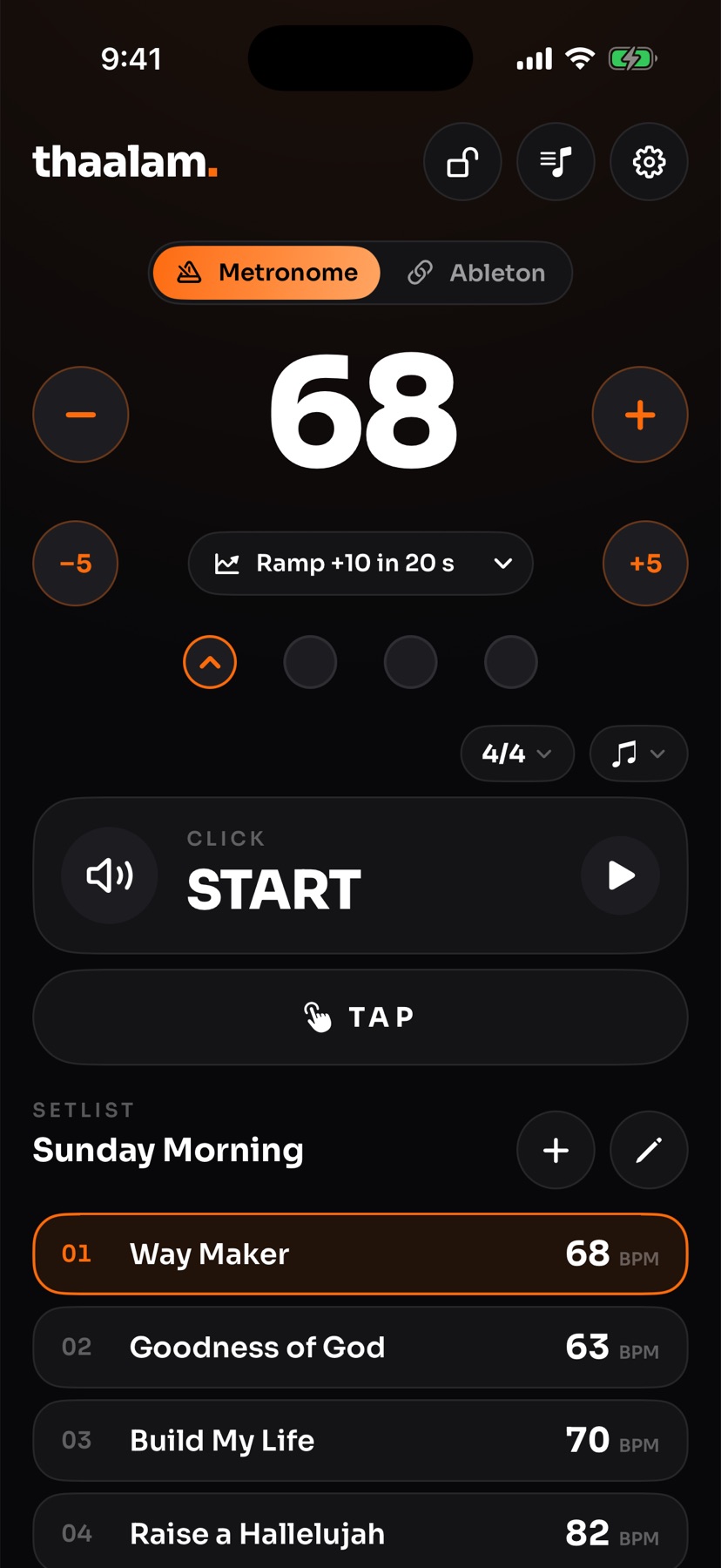
thaalam is a metronome and a stage remote for ableton live. set, tap and ramp the tempo, and switch live’s click on and off, from the iphone in your hand. live keeps playing.
free · iphone · ableton live 11+ on mac and windows
sound familiar?
the laptop running live is at the back. the drummer needs the click, the band can’t see the tempo, and the keyboardist running live is stuck at the laptop. walking over in the middle of a set isn’t an option.
with thaalam, it’s in your hand.
a metronome
- on its own, thaalam is an accurate click for your iphone. no computer, no account.
- big tempo numbers, tap tempo, time signatures from 2/4 to 12/8, accents and subdivisions.
- it keeps playing with the screen locked and the silent switch on.
connect ableton
- install the free thaalam script on the mac or windows pc running live.
- in live, choose thaalam as a control surface. live shows a 6-digit code.
- switch the app to ableton and enter the code once. that’s it.
on stage
- tap a song to jump to its tempo. nudge it by 1 or 5, or tap it in.
- ramp the tempo, for example +10 over 20 seconds, for the last chorus.
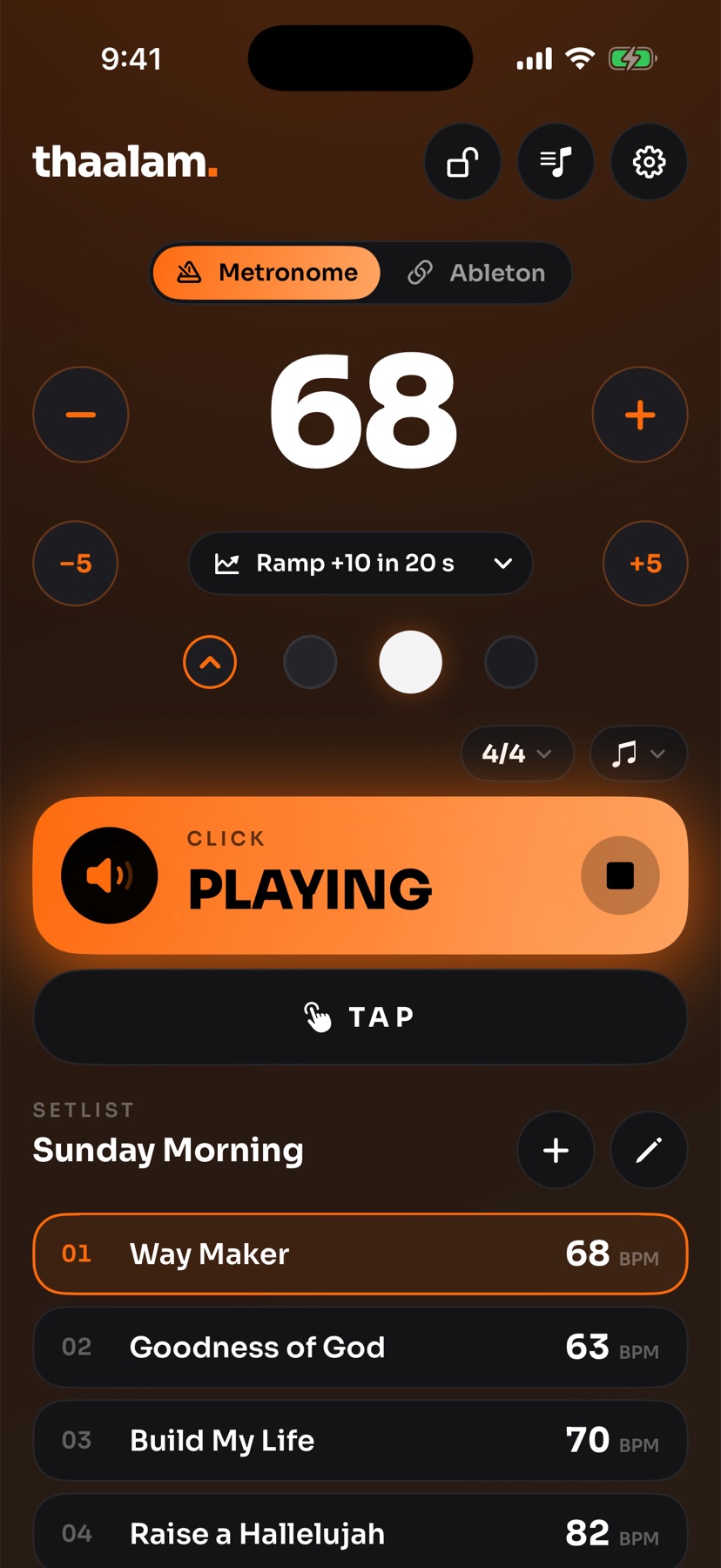
- switch live’s click on and off from your hand. playback never stops.
for the whole band
everyone on the same page.
thaalam isn’t only a remote. put it on every phone in the band and it becomes a tempo screen for everyone.
- the keyboardist running live sees the tempo and the click from the phone on the keyboard stand, not the laptop screen.
- the drummer gets the beat as big dots, a screen flash or a vibration, right on time.
- singers and players see the next song’s tempo and when it’s ramping, without asking.
- only watching? tap the lock and that phone just shows the tempo, so nothing changes by accident.
the click in your hand. live stays on.
1 tap
to change songs
jump to any song
build a setlist with each song’s tempo and time signature. one tap and live is there.
8
phones per computer
the whole band sees it
up to 8 phones on one live set. everyone sees the tempo, the beat and whether the click is on.
0
surprise stops
playback stays put
thaalam changes tempo and the click, nothing else. it never starts or stops live’s playback.
in time with ableton link
with link on, thaalam follows live’s tempo, and the phone’s own click plays exactly on live’s beat and bar. perfect for a player without the in-ear mix.
made for sunday morning
built by musicians at portal productions for real worship sets: quick to read on a dark stage, hard to tap by accident, and it never touches play or stop.
free on the app store
what you get
- every phone shows live’s tempo, beat and click
- big tempo number with ±1 and ±5 at your thumbs
- tap tempo that sets itself after 4 taps
- tempo ramps saved as presets, like +10 in 20 s
- setlists with a tempo and time signature per song
- switch live’s click on and off
- follows ableton link, no script needed for tempo
- the phone’s click locks to live’s beat and bar over link
- time signatures 2/4 to 12/8, with 7/8 groupings
- tap any beat to accent it, or keep the click flat
- 8ths, triplets and 16ths
- screen flash and vibration on the beat
- lock the controls so nothing changes by accident
built for
get thaalam.
1. the app
free · iphone
2. the live script
free · only needed to control ableton live
- ✦ mac: unzip it and open install thaalam. it copies the script into live and shows your pairing code.
- ✦ windows: right-click the zip, choose extract all, then double-click install thaalam. if windows says “windows protected your pc”, click more info, then run anyway. set your wi-fi to private.
- ✦ then: quit and reopen live. in settings → link, tempo & midi, choose thaalam as a control surface (input and output: none).
- ✦ pair: in the app, switch to ableton, pick your computer in settings and type the 6-digit code live shows. once.
the iphone and the computer need to be on the same wi-fi. some guest and church networks block devices from seeing each other: use a private network or the iphone’s personal hotspot.
questions
do i need ableton live?
no. switch thaalam to metronome and it’s a full metronome on its own. ableton live is only needed if you want thaalam to control live’s tempo and click.
what does the thaalam script do?
it lets the app switch live’s click on and off, set and ramp the tempo, and confirm each change. it only reads live’s state and writes the tempo and the click, nothing else.
does it work on windows?
yes. there is an installer for mac and one for windows. both put the script into ableton live and show your pairing code.
can it stop live’s playback by mistake?
no. thaalam never starts or stops playback. it changes the tempo and the click only, so the band never loses the track.
how do i connect?
put the iphone on the same wi-fi as the computer. open thaalam, switch to ableton, pick your computer in settings and type the 6-digit code live shows at the bottom of its window. you only pair once.
what about ableton link?
turn on link in live and in thaalam and the tempo follows without the script. the phone’s own click then plays exactly on live’s beat and bar. switching live’s click on and off still needs the script.
what do i need?
An iPhone with iOS 17 or later. For Ableton control: Ableton Live 11 or newer on a Mac or Windows PC, on the same Wi-Fi. For tempo over Ableton Link: Link turned on in Live.
what does thaalam mean?
thaalam is the rhythm, the beat that holds the music together. that’s the job of the app.
need a hand?
email portaldevsup@gmail.com. a real person at portal productions answers, usually within a day.
Ableton and Ableton Link are trademarks of Ableton AG. Thaalam is not affiliated with Ableton.